The Best Free Interior Design Apps for iPhone and iPad in 2026, Ranked by What Free Gets You
 The Idori team
·
·
11 min read
Yes, there are free apps for interior design, and "free" means three different things on the App Store. Some apps are free, full stop: there is nothing to buy inside them. Some have a real free plan with a ceiling. And some are free to download and ask for a subscription before you have seen a single result. This list sorts eight interior design apps for iPhone and iPad by what you can actually do without paying, including free AI room design, and says exactly where each one starts charging.
The best free interior design app depends on the job. Redesigning the room you actually have with AI, from a photo, with control over what changes and every version kept: Idori, whose free plan includes the redesign itself. Seeing real furniture in your own room, with nothing to buy in the app: the IKEA app. Drawing a room in 2D and 3D: Planner 5D. Rendering a 3D room: Homestyler. Trying paint colors on a photo of your walls: Sherwin-Williams Color Expert. Collecting ideas: Pinterest. Photos of real finished rooms and the people who built them: Houzz. A mood board: Morpholio Board. Most one-tap AI restyling apps are free to download only; the third section explains how to tell before you install.
Search for free interior design apps and the lists you find have a pattern. One widely syndicated list was written in 2021 and counts a decorating game and a contractor directory among its seven apps. Another describes a product as "free to use with no hidden costs" right next to its $149 starting price. Several list tools that only run in a web browser, and several more are published by an app that puts itself first without saying so. This one is published by Idori, and Idori is first. The difference is that the case below is made of things you can check in ten minutes: open the App Store page, scroll to In-App Purchases, download the app, and see whether you get a result on your own room before anyone asks for a card.
Every price and free allowance here comes from each app's US App Store listing and its own pricing page, read in November 2026. Where another app is the better free pick for a job, this page says so.
Three kinds of free
Before the ranking, the distinction that most lists blur.
- Free, full stop. The IKEA app, Sherwin-Williams Color Expert, Houzz, and Pinterest list no in-app purchases for you to buy. They are free because they are paid for another way: by the furniture, the paint, the professionals, or the ads. Nothing is locked, and each one does a single job well.
- A free plan with a ceiling. Idori, Planner 5D, Homestyler, and Morpholio Board let you do the real work without paying, up to a limit: a weekly allowance, part of a catalog, a render size, a number of projects. The question to ask is whether the limit sits above or below what you came to do.
- Free to download. The app costs nothing to install, and the first screen after onboarding is a subscription, usually a three-day trial into a weekly charge. This is where most one-tap AI room restylers live. It is a legitimate way to sell software. It is not what people mean when they search for a free app.
How this ranking works
One question decides the order: how far does this app take a real design decision before it asks for money? Four checkable things follow.
- A result before a paywall. Can you finish the job you came for on the free plan, or only look at it?
- Your room, not a sample. Does the free plan work on your own space, from a photo or a scan, or on a demo room?
- What the limit is. An allowance that refills, a smaller catalog, a watermark, or a countdown to a charge are very different limits.
- What the price becomes. If you do pay, is it a plan you chose or a trial you forgot?
| App | What it is | What you get without paying | Where paying starts |
|---|---|---|---|
| Idori | AI redesign of your real room from a photo (iPhone, iPad) | Freeform Prompt, Spot Edit, Style Match, Inspiration, all 40+ Styles, Compare, Branch, Version History, on a weekly allowance | Idori Pro: AI Ideas, a larger allowance, faster processing; credit top-ups |
| IKEA | Scan your room and place IKEA products in it (iPhone, iPad) | Everything | Nothing to buy in the app, except the furniture |
| Planner 5D | 2D and 3D home planner (iPhone, iPad, Android, web) | The 2D and 3D editor, unlimited projects, a limited part of the catalog | Full catalog of 8,400+ items, HD renders, AI tools; plans from $7.99 a week |
| Homestyler | 3D room planner with rendering (iPhone, iPad, Android, web) | The planner, a large model and material library, standard renders | Watermark removal, higher-resolution renders, AI credits; plans from $2.99 a week |
| Sherwin-Williams Color Expert | Paint colors on a photo of your walls (iPhone) | Everything | Nothing to buy in the app, except the paint |
| Inspiration boards (iPhone, iPad, Android, web) | Everything, with ads | No consumer plan | |
| Houzz | Photos of real rooms and a directory of professionals (iPhone, iPad, Android, web) | Browsing 20M+ photos, saving, finding and contacting pros | No in-app purchases; you pay the pros you hire |
| Morpholio Board | Mood boards (iPhone, iPad, Mac) | Up to 5 projects, markup tools, image export, AR furniture | More projects, palettes, PDF and spreadsheet export; tiers from $4.99 |
Characterizations reflect each product's App Store listing, in-app purchase list in the US store, and published pricing page at the time of writing, November 2026. Free allowances and prices change often; check before you subscribe anywhere.
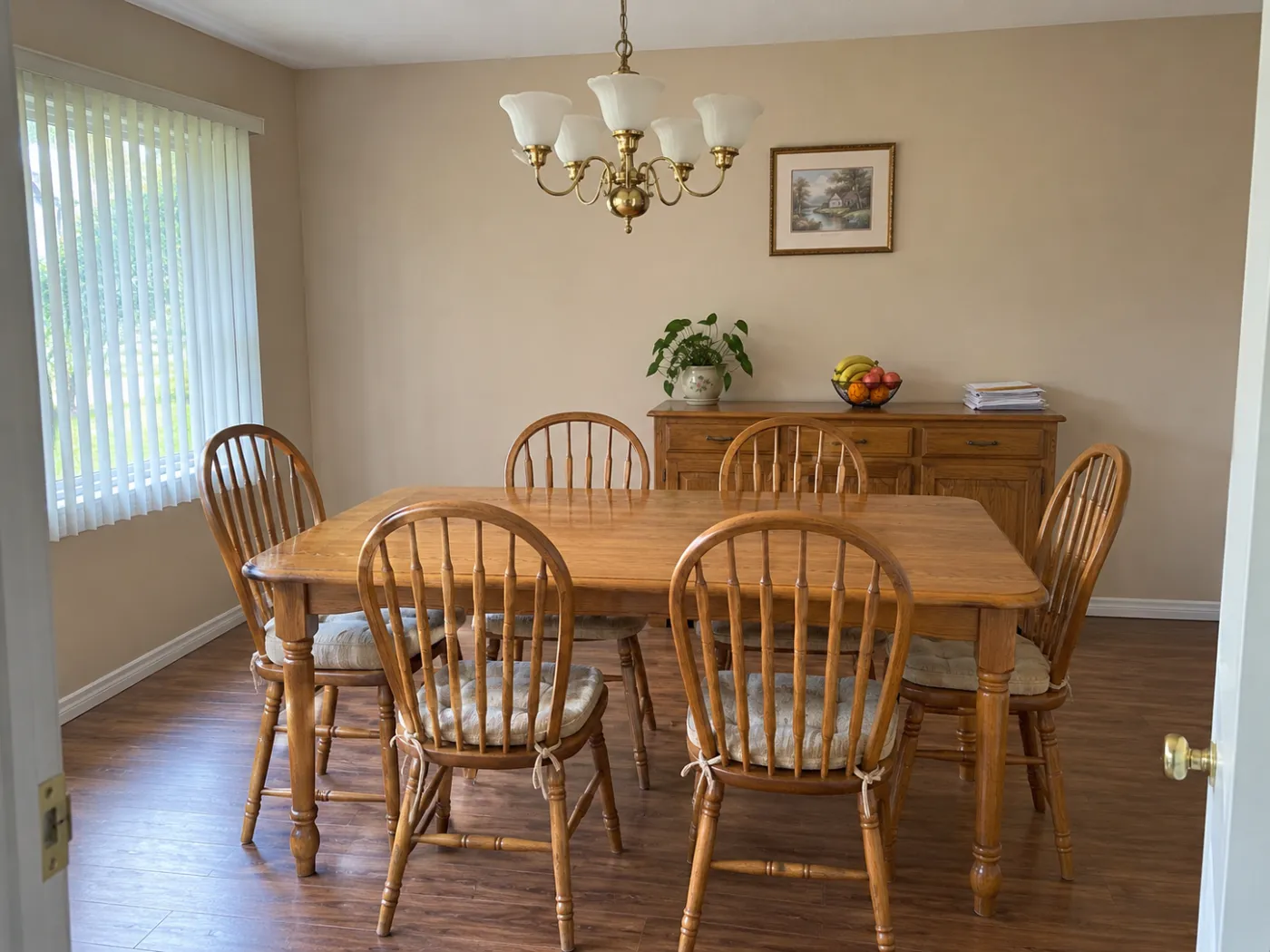
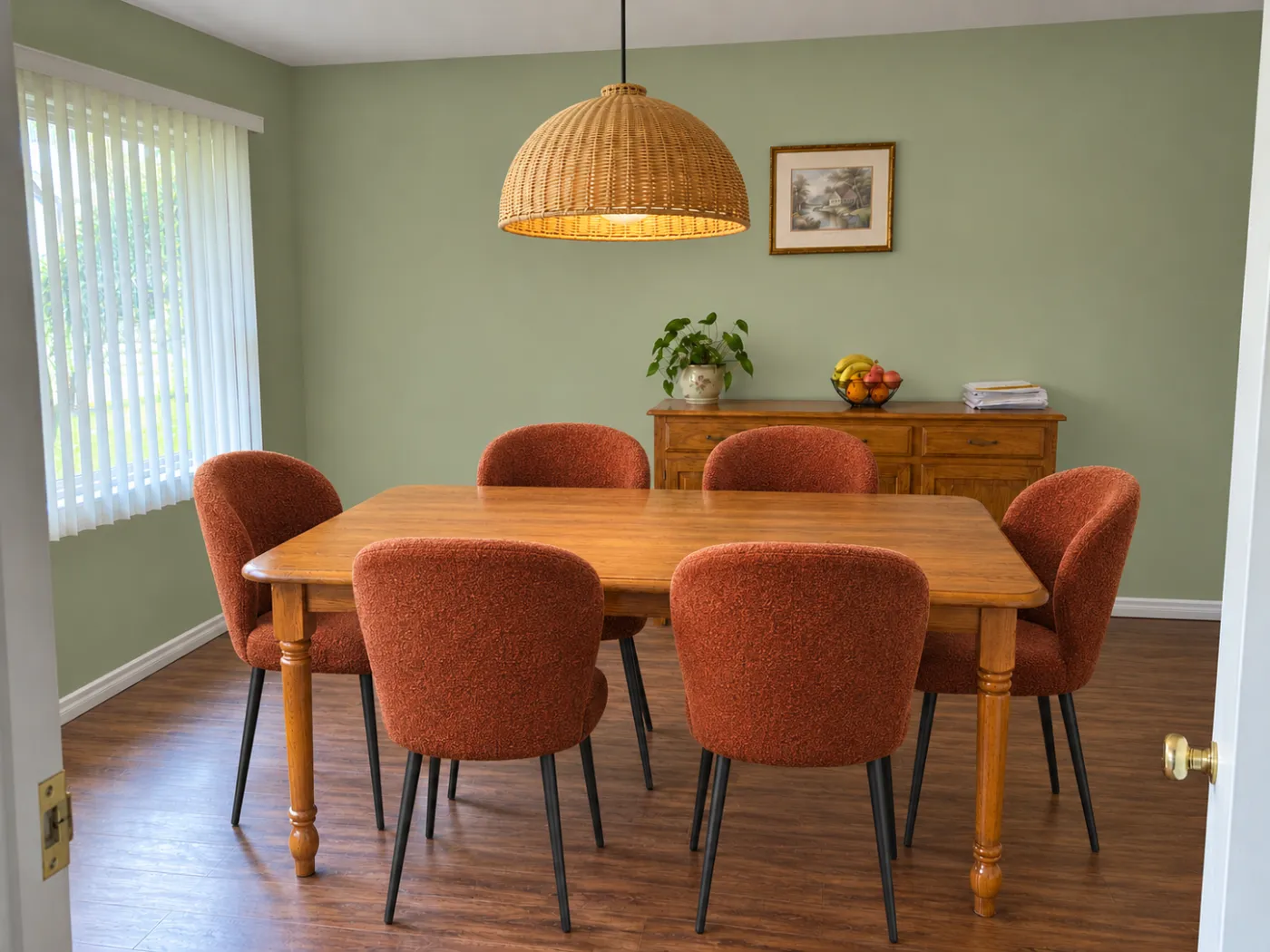 Before
After
1. Idori: best free app for redesigning the room you actually have
Idori is first because of what its free plan contains. In most AI interior design apps the redesign is the paid part and the free part is the download. In Idori, the editing studio itself is free: you take one photo of your room and work on it, with no trial to start and nothing to cancel. The plan refills on a weekly allowance, so the limit is how much you do in a week, not which tools you may touch.
Say what you want, in your own words. A Freeform Prompt is a sentence: "paint the wall behind the sofa navy and keep everything else". Idori edits your photo instead of inventing a new room, in any language, and reads a short follow-up like "too dark" as a comment on the last change. Each result is a saved version.
Change one thing and keep the rest. Spot Edit lets you pin up to four exact spots and give each its own instruction, or a photo of a real product to place there. Only the pinned spots change. This is the control that one-tap restylers do not have at any price, and it is free here.
Match a photo you love. Saw a room on Pinterest? Attach it with Style Match and Idori carries its palette, materials, and mood onto your room while your walls, windows, and layout stay yours. No photo? Inspiration is a library of more than 1,000 example rooms to browse and try on your space.
Forty-plus styles, one tap each. All of Idori's 40+ Styles are in the free plan, from Japandi and Scandinavian to Art Deco, Quiet Luxury, and Bookshelf Wealth. Try five on the same photo and line them up.
Every option is kept. Each result becomes a version in the room's project. Compare slides between any two on the same photo, Branch starts a second direction without losing the first, and Version History keeps the whole path. Projects live on your device. Uploads and prompts are used only to complete a generation, are not retained on Idori's servers, and are never used to train models.
The trade-offs, in full: the free plan runs on a weekly allowance, so a heavy afternoon of experimenting can use it up before the week does; credit top-ups are available to everyone. AI Ideas, where you state a goal and get five directions with a plan for each, comes with Idori Pro, along with a larger allowance and faster processing. Idori runs on iPhone and iPad only. And it shows a realistic picture of your room, not a measured floor plan, so for dimensions pair it with a tape measure or one of the planners below. If the room is real and the question is what it should become, this is the free app built for that. See it on the AI interior design page.
2. IKEA: best free app for seeing real furniture in your own room
The IKEA app is one of the most rated home apps on the store, with more than 150,000 ratings, and it lists no in-app purchases. Its listing puts the design feature plainly: scan your room and add products to visualise them in your space. The pieces are real products at their real dimensions, with a real price next to each one.
The trade-offs: the catalog is IKEA's and only IKEA's, so this is a way to furnish a room from one store, not to decide a color scheme or a style. The most complete room scanning needs an iPhone or iPad with LiDAR, and some recent reviewers describe scanning as unreliable.
Best for: checking whether a specific IKEA piece fits and looks right before you carry it home.
3. Planner 5D: best free app for drawing a room in 2D and 3D
Planner 5D is the big name in casual home planning, with more than 42,000 ratings and versions for iPhone, iPad, Android, and the web. The free plan gives you the 2D and 3D editor and unlimited projects, which is the generous part: you can draw as many rooms as you like and walk through them.
The trade-offs: the free catalog is a fraction of the full one. The listing describes limited catalog access and no furniture customization on the free plan, and the full catalog of more than 8,400 items, HD renders, and the AI tools sit behind a subscription, with plans in the US store from $7.99 a week. Some recent reviewers say the app pushes hard toward a trial. And like every planner, you rebuild the room before you design it, with catalog lookalikes instead of your own furniture.
Best for: planning an empty room or a whole home from scratch in measured 2D and 3D.
4. Homestyler: best free app for rendering a 3D room
Homestyler is a 3D room planner with a rendering engine attached. Its listing describes a free tier that stays free, with a large library of materials and templates, and its pricing page lists unlimited standard-resolution renders on the Basic plan. For a free tool, the finished pictures are convincing.
The trade-offs: removing the watermark is a paid feature, higher-resolution renders cost coins, and the AI designer runs on credits. Plans start at $2.99 a week. It is also a modeler: you build the room in 3D first.
Best for: a rendered image of a room you are willing to model yourself.
5. Sherwin-Williams Color Expert: best free app for trying paint colors
Color Expert is Sherwin-Williams' current app, and it is free with no in-app purchases: take a photo of your room, try real paint colors on the walls, get color recommendations, save the ones you like, and order samples in the US and Canada.
The trade-offs: it does one thing, wall color, in one brand's palette. It is listed for iPhone, not iPad. And a color on a screen is a starting point; order the sample.
Best for: narrowing fifty whites down to three before you buy sample pots. If you already have a color you love and want to know what it is, our free paint color identifier reads it from a photo.
6. Pinterest: best free app for collecting ideas
Pinterest is where most rooms start. It is free, its only in-app purchases are for advertisers, and nothing about saving, boards, or collages is locked. A board of thirty saved rooms is the fastest way to find out what you actually like.
The trade-offs: it shows other people's rooms. It cannot show yours. The step from "I love this" to "would this work in my living room" is exactly the step it leaves out, which is the reason Idori has Style Match: attach the pin and see it on your room.
Best for: finding your taste before you touch your room.
7. Houzz: best free app for real rooms and the people who built them
Houzz has more than 325,000 ratings and no in-app purchases. It is a library of more than 20 million photos of finished, real projects, filterable by room and style, with a directory of the designers, architects, and contractors behind them.
The trade-offs: it has become a place to browse and to hire, not a design tool. Recent reviewers note that you can no longer shop from the app, and its listing no longer describes placing products in your room.
Best for: seeing how real projects turned out, and finding a professional near you.
8. Morpholio Board: best free app for a mood board
Morpholio Board, from Vectorworks, is the mood board app designers use to present a scheme: furniture, fabrics, swatches, and notes on one page. The free plan covers up to five projects with markup tools, image export, and AR furniture viewing, and it is at its best on an iPad.
The trade-offs: palettes, PDF and spreadsheet export, and unlimited projects are paid tiers, from $4.99. A board shows the ingredients side by side. It does not show the room.
Best for: pulling a scheme together to show a partner, a client, or a contractor.
Free to download is not the same as free
Search "AI interior design" on the App Store and most of the top results are one-tap restylers: upload a photo, pick a style, get a picture. Home AI, Remodel AI, and Renovate AI are the most rated. All are free to download. Their in-app purchase lists tell you the model: weekly plans from $4.99 to $14.99, and three-day trials that convert to a weekly or yearly charge. In each one's most recent App Store reviews you will find people saying they could not get a first result without starting a trial or a subscription.
That does not make them bad apps. It makes them paid apps, and it is worth knowing before you install five of them looking for the free one. The check takes a minute: on the App Store page, scroll to In-App Purchases. A list of weekly plans means a subscription app with a trial. No list at all means the app is free, full stop. A list with a monthly or yearly plan and a described free tier is the middle case, and the listing should say what the free tier includes. If it does not, assume it includes very little.
What about Gemini and ChatGPT?
Both include image generation on their free tiers, within usage limits that change and are not published as a fixed number, and both will take a photo of your living room and "redesign" it if you ask. For a rough idea they are a fine playground.
They are the wrong instrument for a decision. There is no project that remembers the version you liked, no slider to Compare two options on the same photo, and no way to pin one wall while the rest stays put. Play there; decide somewhere built for it.
The rest of the store
A few more are worth knowing. Live Home 3D is a full 3D home modeler whose free version allows one project with watermarked exports. magicplan measures a room into a floor plan and is priced for contractors. Room Arranger is free except for saving, which is a one-time purchase. Havenly's app is a front door to paid human designers. And Design Home, which appears on several "free interior design app" lists, is a game. Most of these are useful for one slice of a project. Very few start from your actual room and help you decide what it should become without charging first.
Match the app to the job
Reach for Idori when
- The room is real, and the question is what it should become
- You want AI redesign without starting a trial
- You want to change one thing and keep everything else exactly as it is
- You have a photo you love and want to see it on your own room
- You want every option kept so you can Compare them
- You want photos of your home to stay private
Reach for the others when
- You are buying from IKEA and want to see the piece in place: the IKEA app
- The room is empty and you want to draw it in 3D: Planner 5D
- You want a rendered image of a room you model: Homestyler
- The only question is wall color: Sherwin-Williams Color Expert
- You do not know what you like yet: Pinterest, then Houzz
- You need a board to present a scheme: Morpholio Board
Why the ranking comes out this way
Sort the store by what free really means and it falls into a clear shape. The apps with nothing to buy each do one narrow job, because something else pays for them: a furniture catalog, a paint range, a directory. The planners give away the drawing board and sell the catalog. The AI restylers give away the download and sell the result. Idori is the one that puts the AI redesign of your own room inside the free plan, with the controls that make it useful: your words, pinned spots, a photo to match, forty-plus styles, and a memory of every version. That is the reason it is first on a list about free.
Popularity is not the ordering principle here. Pinterest, Houzz, and IKEA have hundreds of times more ratings than Idori, and each is the right free tool for its job. But most people searching for a free interior design app have a room and a question about it. This list is ordered by how far each app takes that question before it asks for anything.
Try it on your own room
The fastest way to judge any of this is with your own room. Idori redesigns your room from one photo, changes only what you pin, and keeps every version to Compare, on iPhone and iPad. Free to start.
Download Idori freeQuestions people ask
Yes, several, and they are free in different ways. Idori is free to start on iPhone and iPad: the free plan redesigns a photo of your real room with Freeform Prompt, Spot Edit, Style Match, Inspiration, and all 40+ Styles, and keeps every version to Compare, on a weekly allowance. The IKEA app, Sherwin-Williams Color Expert, Houzz, and Pinterest have no in-app purchases at all. Planner 5D, Homestyler, and Morpholio Board have free plans with limits on the catalog, the renders, or the number of projects.
For redesigning a room you actually have, Idori. Most AI interior design apps on the App Store are free to download and then ask for a weekly subscription or a free trial before the first result. Idori's free plan includes the AI redesign itself: describe a change in your own words, pin one spot with Spot Edit and change only that, match a photo you love with Style Match, or apply any of 40+ Styles, on a weekly allowance with no trial to cancel. AI Ideas and a larger allowance come with Idori Pro.
Free with nothing to buy in the app: the IKEA app, Sherwin-Williams Color Expert, Houzz, and Pinterest. Free plan with a ceiling: Idori (a weekly allowance), Planner 5D (a limited catalog), Homestyler (lower-resolution renders and a watermark), Morpholio Board (five projects), and Live Home 3D (one project, watermarked exports). Free to download but built around a trial into a weekly subscription: most one-tap AI restyling apps. Check the In-App Purchases list on the App Store page before you download: weekly plans are the sign.
Idori is free to download and free to use on a weekly allowance. The free plan includes Freeform Prompt redesigns, Spot Edit, Style Match, the Inspiration library, all 40+ Styles, and Compare, Branch, and Version History. Idori Pro adds AI Ideas, a larger weekly allowance, faster processing, and priority, and credit top-ups are available to everyone.
Take one photo of the room in Idori, then either type what you want ("warmer, with linen curtains and a jute rug, keep my sofa"), pick one of the 40+ Styles, or attach a photo you love for Style Match. Each result is saved as a version you can Compare with the original. Our step-by-step guide to decorating a room with AI walks through it.
Yes. Planner 5D and Homestyler both have web versions with free plans, so you can draw a room in 2D and 3D in a browser, with the same limits as their apps: a restricted catalog on Planner 5D, and lower-resolution, watermarked renders on Homestyler. Idori is an iPhone and iPad app. It starts from a photo of the room, so there is nothing to draw.
Yes. Idori, the IKEA app, Planner 5D, Homestyler, Houzz, Pinterest, and Morpholio Board all run on iPad, and Morpholio Board is at its best there. Sherwin-Williams Color Expert is listed for iPhone. Our list of the best iPad apps for interior design ranks the iPad options by the job each one wins.
You can try. Both include image generation on their free tiers, with usage limits that change and are not published as a fixed number. Each will take a photo of your room and return a redesigned picture. What they do not give you is the project: a saved history of versions of the same room, a slider to Compare two of them, or a way to pin one spot and keep the rest. For a quick spark they are fine. For a decision, use a tool built to keep your room the same room.