The Best Apps to Help You Decorate Your Home for iPhone and iPad in 2026, Ranked by the Job
 The Idori team
·
·
11 min read
Decorating is the part of a home where the expensive mistakes are small ones: a rug a size too small, a paint color that turns gray after dark, a lamp that looked right in the store. None of those is hard to fix once it is in the room. All of them are easy to avoid if you can see them in the room first. The best app to help you decorate your home is the one that shows your own rooms, with your own furniture, decorated, and lets you change one thing at a time until it is right. Here is the honest map of the category, from photo-based AI to human designers to paint and furniture visualizers.
The best app to help you decorate your home in 2026 depends on the job. Seeing your actual rooms decorated from a photo, keeping what you own, and changing one thing at a time: Idori. Handing the decisions to a human designer: Havenly. Trying real paint colors on your walls before you buy a sample: Sherwin-Williams Color Expert. Placing IKEA furniture and decor in your room: the IKEA app. Branded furniture in AR and a full 3D plan: Homestyler. Inspiration from finished homes and hiring a local pro: Houzz. Collecting ideas and finding your style: Pinterest. A quick one-tap AI makeover from a preset: Home AI. Below, each one is ranked for the job it wins, with the trade-offs in plain terms.
Search "app to help me decorate my house" and the top results are roundups from a moving company (2019), a mortgage lender (2016, lightly updated in 2024), and a home builder (2018). They recommend the same handful of names, Pinterest, Houzz, a paint visualizer, a floor planner, and none of them was written in a year when an app could look at a photo of your living room and decorate it. That changed the category, and this list is written for the category as it is now. It is published by Idori, and Idori is first. The difference is that the case below is made of things you can check in your own living room in ten minutes: does the app start from your room or from a catalog, does the sofa you are keeping stay in the picture, can you change the lamp without the whole room being redrawn, and is the version you liked on Sunday still there to compare on Wednesday. Where another tool is the better pick for a job, this page says so.
There is also a real split in this category that most lists blur. Inspiration apps show you other people's finished rooms. Shopping and AR apps place new products into your room through the camera. Designer services hand the decisions to a person. And photo apps decorate a picture of the room you actually live in. All four are useful. They answer different questions: "what do I like," "will this piece fit," "can someone just do it for me," and "what would my room look like decorated." Most people searching for an app to help them decorate are asking the last one, and often the first one too.
How this ranking works
Every app on this list can show you a beautiful room, so a beautiful room proves nothing. Each one is judged against one question instead: will it help you decorate the rooms you actually have, so you buy the right things once? Six checkable things follow.
- Your room, not someone else's. Does it start from a photo of your room, with its light, its windows, and its floor, or from a feed of finished homes and a catalog?
- It keeps what you own. Most decorating keeps the big pieces. Can you tell the app what stays, and does the sofa you are keeping actually stay?
- One change at a time. Decorating is layers: paint, then lighting, then textiles, then art. Can you swap the lamp and keep everything else exactly as it is?
- It explains itself. When a room feels unfinished and you cannot say why, does the app tell you what it needs and why, or wait for you to pick a style?
- Memory, room by room. A house is decorated over months. Is each room a project with versions you can return to and Compare, or a screen you lose when you try the next idea?
- Honest pricing and private photos. Is there a real free plan, a per-room fee, or a short trial into a weekly charge, and what happens to photos of your home?
| App | What it is | Starts from your room | Keeps what you own | Versions & Compare | Price to start |
|---|---|---|---|---|---|
| Idori | Photo-based AI decorating + iteration studio (iPhone, iPad) | Yes: one photo per room | Yes: only pinned spots change | Projects, Version History, Compare, Branch | Free, weekly credit allowance |
| Havenly | Human designer service with an AI chat assistant (iPhone, iPad, web) | Your photos and measurements, sent to a designer | The designer works around what you list | Revisions with your designer | $89 per room online, $299 in person |
| Sherwin-Williams Color Expert | Paint color visualizer and color matcher (iPhone, iPad) | Yes: a photo of your walls | Yes: only the wall color changes | Saved colors | Free |
| IKEA app | Shopping app with room scan and product placement (iPhone, iPad, Android) | Yes: a scan of the room | Can erase pieces; adds IKEA products | Saved lists and designs | Free, IKEA products only |
| Homestyler | 3D floor planner with branded furniture in AR (iPhone, iPad, Mac, web) | Via drawing, a photo, or AR | Branded catalog models | Saved projects | Free; Pro by subscription |
| Houzz | 20M+ photo inspiration library and pro directory (iPhone, iPad, Android, web) | No: other people's finished rooms | Not applicable | Saved idea boards | Free |
| Visual inspiration boards (iPhone, iPad, Android, web) | No: ideas from everywhere | Not applicable | Boards | Free | |
| Home AI | One-tap AI room makeovers from presets (iPhone, iPad) | Yes: from a photo | Restyles the whole photo | Not described | Weekly $4.99 to $14.99 or yearly $19.99 to $39.99 |
Characterizations reflect each product's published features, App Store listing, and plans at the time of writing, November 2026. Prices and free allowances change often; check before you subscribe anywhere.
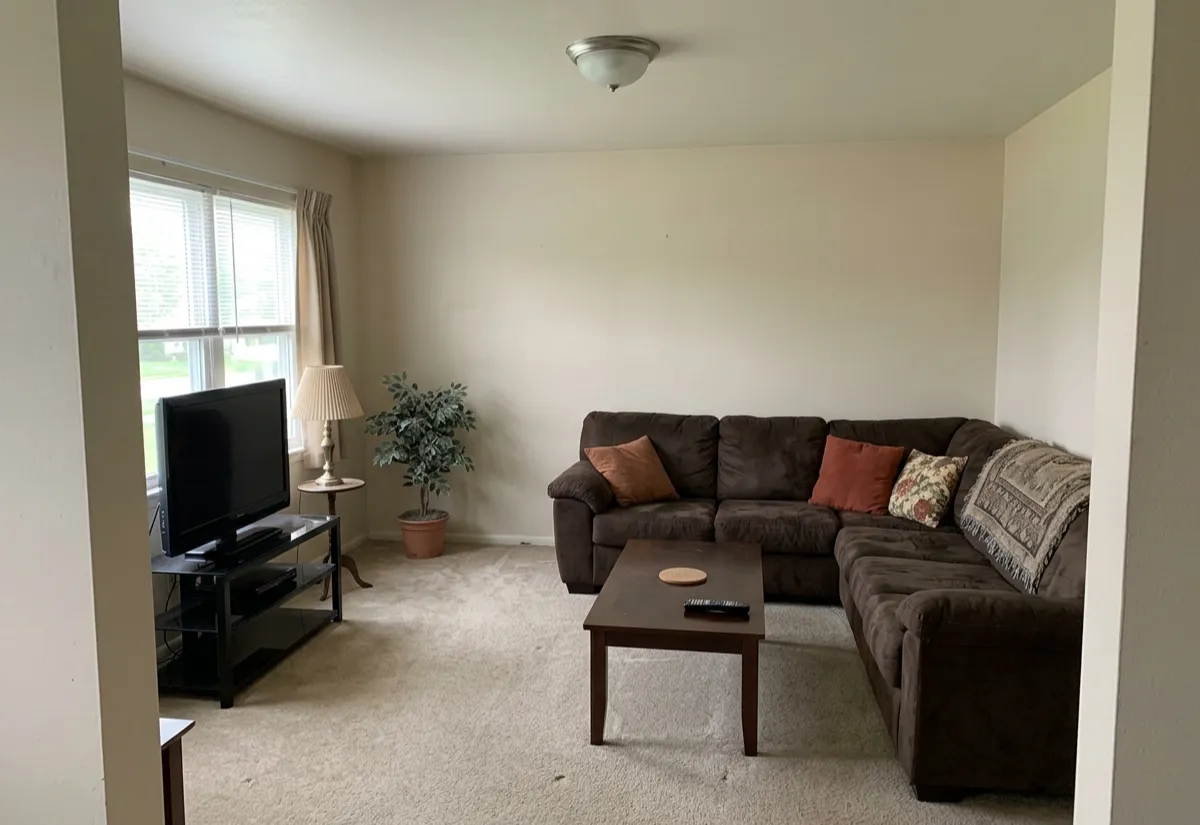
 Before
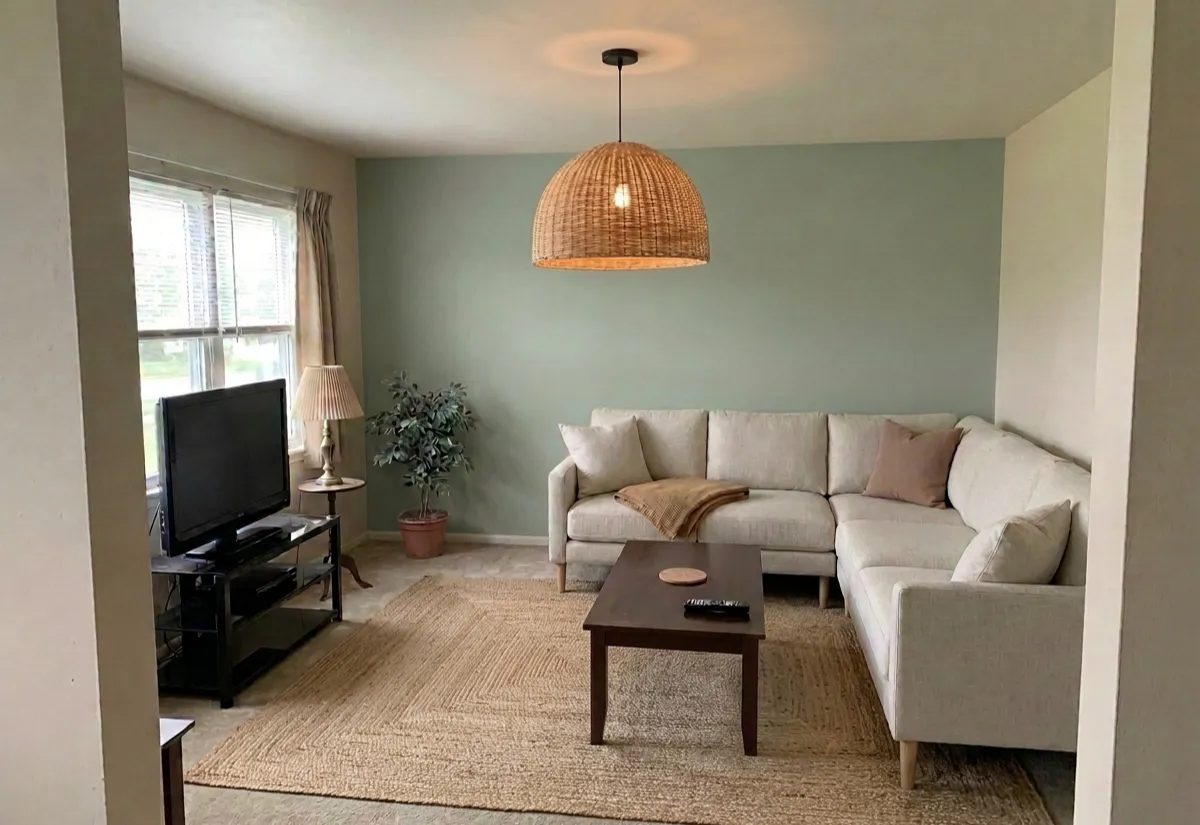
After
1. Idori: best for decorating the rooms you have, one decision at a time
Idori is first because of the premise it is built on. Decorating is not designing a room from scratch. It is a series of small decisions about a room that already exists, the wall color, the lamps, the curtains, the rug, the art, made against the sofa and the floor you are keeping. So the goal of a decorating app is not to hand you a stranger's finished room. It is to help you make each of those decisions well, on your own room, before you spend anything. Idori starts from one photo of the room as it is, reads it the way a designer would from the doorway, proposes directions, and then hands you the controls. It runs on iPhone and iPad, and when the room needs a better layout before it needs new things, it works as a room rearrange app too. Five features carry that idea, each one checkable on your own room.
It tells you what the room needs before it changes anything. AI Ideas reads and analyzes the room in your photo, trained on real work from professional interior designers, then proposes five distinct decorating directions, each with its reasoning: why the room reads flat after dark with one ceiling light and no lamps, why the rug is too small to hold the seating together, why the long wall behind the sofa is asking for art at eye level. One tap shows any of them on your photo. If you have ever wanted to learn how to decorate, this is the fastest teacher there is, because the lesson is about your room. Behind that tap sit several model calls that analyze the room and anchor each recommendation in it, a deliberately more expensive pipeline than a single generation, because a better answer to "what does this room need" is worth the inference cost.
Only what you pin changes. Decorating happens one layer at a time, and one layer at a time is exactly what one-shot AI cannot do: ask it for a new lamp and it gives you a new sofa, a new floor, and a different window. Spot Edit flips that relationship, and it is a rule rather than a toggle. Pin up to four exact spots, the sofa, the back wall, the ceiling light, the bare floor, and tell Idori what each should become. Attach a photo of the exact lamp, print, or rug from a store page and call it out as @1 in the prompt to see that product in your room. Everything you did not pin stays exactly as it is.
Forty-plus complete styles, applied to your room. Sometimes you do not know what you want until you see it. Any of Idori's 40+ curated styles decorates the photographed room in one tap, palette, textiles, lighting, and the character of the pieces, while keeping the room itself: its windows, its proportions, its light. Japandi and Scandinavian calm a busy room down, Mid-Century Modern and Industrial give it edge, Modern Farmhouse and Cottagecore make it somewhere to sit down at the end of the day. Seeing three of them on your own living room settles in a minute what a week of scrolling boards cannot.
Your own words, in any language. A Freeform Prompt is how you brief Idori when you already know the direction: "keep the sofa and the bookshelf; warm the room up with two table lamps, linen curtains, a rug big enough for the front legs of the sofa, and one large print over it." Write it in Spanish, Italian, Arabic, or Japanese and it works the same; Idori reads the intent, not the English. Naming what stays is most of what makes AI decorating useful, and Idori was built to be briefed that way.
Decorating is a comparison problem, so every change is a version. Sage or warm white? One big rug or two small ones? The brass lamp or the ceramic one? Nobody can hold two versions of a room in their head, and paint samples on the wall only answer one question at a time. Each room becomes a project in one continuous Workspace, and every change is a version you can return to. Compare slides between any two on the same photo, so you decide with your eyes rather than your memory. Branch from a version you like to try one more idea without losing it, Version History keeps the whole path, and any version exports at full quality to shop from or send to whoever shares the room. Decorating the whole house works the same way: photograph each room as its own project, settle a palette in the room you use most, and carry it into the rooms that connect to it, so the house reads as one home rather than a set of unrelated makeovers.
Your home stays private. Projects and Version History live on your device. Uploads and prompts are used only to complete one generation, are not retained on Idori's servers, and are never used to train models. Photos of the inside of your home deserve that.
The trade-offs, in full: Idori runs on iPhone and iPad only, so Android and desktop users need one of the tools below. It is not a store: it shows you what the room should look like, and the buying happens wherever you shop, though a reference photo of a real product lets you see that exact piece in your room first. It is not a human designer either; if you want someone else to make the decisions and send you a shopping list, Havenly is the better pick. And AI Ideas comes with Idori Pro, while Freeform Prompt, Spot Edit, Style Match, Inspiration, all 40+ Styles, Compare, Branch, and Version History are included in the free plan. If the rooms are real and most of the furniture is staying, this is the tool built for that. See it in action on the AI decorating app page.
2. Havenly: best for handing the decisions to a human designer
Havenly matches you with a real interior designer who works on your room remotely, by video call, chat, or text, or in person. You get a finished design plan, 3D renderings of your actual space, a floor plan, revisions until it feels right, and a shopping list from hundreds of brands with members-only prices. The app adds a style quiz, a feed of real rooms its designers have done, and a newer AI chat assistant for quick ideas. At the time of writing, the online package is $89 per room and the in-person package is $299 per room, both marked down from higher list prices.
The trade-offs: it is a service, not a tool, so every round goes through another person and takes days rather than seconds. The price is per room, which adds up across a house, and the shopping list naturally leans toward the brands Havenly sells. There is no free design package. The App Store rating base is modest for its reputation, under five thousand ratings, and the app was last updated in March 2026.
Best for: people who would rather approve a plan than make every decision themselves.
3. Sherwin-Williams Color Expert: best for trying real paint colors on your walls
Paint is the cheapest decorating change and the easiest to get wrong, and Sherwin-Williams' Color Expert app is built for exactly that decision. Snap a photo of your room and see any Sherwin-Williams color on your walls, get color recommendations based on what is already in the space, save favorites by project, and order physical color chips and peel-and-stick samples straight from the app. It is free, with around seven thousand ratings.
The trade-offs: it does one layer. You will see the wall color, not the lamps, curtains, and rug that make the color work, and only Sherwin-Williams colors are available. Sample ordering is limited to the U.S. and Canada (excluding Quebec). A photo visualizer is a first filter, not a final answer: always check a real sample on the wall in morning and evening light.
Best for: narrowing down a paint color before you buy samples. To find out what color a wall in a photo already is, with its HEX code, undertone, and approximate LRV, our free paint color identifier does that in the browser.
4. IKEA app: best for placing IKEA furniture and decor in your room
The IKEA app, with around 150,000 ratings, is a shopping app with real decorating tools inside it. Scan your room with your iPhone or iPad, erase the furniture that is there, and place true-to-scale IKEA products into the scene, from sofas and shelving to lamps and rugs. It works best on devices with a LiDAR scanner, and it also has interactive planners for kitchens and other rooms. For "would this rug and this lamp work in my living room," nothing on this list is more direct, and it is free.
The trade-offs: everything you add has to come from IKEA's catalog, so it is a decorating tool for one store. There are no suggestions about what the room needs; you browse and place. Paint, curtains you already own, and the overall look of the room are outside its scope.
Best for: deciding which IKEA pieces to buy and seeing them in place.
5. Homestyler: best for branded furniture in AR and a full 3D plan
Homestyler is a 3D floor planner with a library of more than a million branded furniture models, a live AR mode that shows pieces from brands like IKEA and West Elm in your room at 1:1 scale, and high-quality renders of the finished room. It runs on iPhone, iPad, Mac, and the web, and has a large design community with regular decorating challenges.
The trade-offs: it is a designer's tool with a homeowner door, and there is a learning curve. To decorate a room fully you rebuild it as a 3D model, and what you see is the model, not your room. The largest model library and watermark-free exports require a Pro subscription.
Best for: planning a fully new furniture scheme with real branded products and a rendered result.
6. Houzz: best for inspiration and hiring a local pro
Houzz is the reference library of home design, with more than 20 million high-resolution photos of finished interiors you can browse by style, room, and location, an editorial magazine of decorating guides, and a directory of more than three million home professionals, including interior designers and decorators, with reviews and portfolios. It has over three hundred thousand ratings on the App Store and is free.
The trade-offs: every photo is someone else's room, with someone else's light and proportions, so it tells you what you like rather than what will work in your space. It does not show your room decorated. The app leans toward renovation and hiring, which is useful if you want a pro and noisy if you just want to pick a rug.
Best for: building a sense of your style, and finding a decorator near you.
7. Pinterest: best for collecting ideas and finding your style
Pinterest is where most decorating projects quietly start: boards of rooms, palettes, and pieces you love, saved from everywhere, with billions of ideas and shoppable pins. With more than five million ratings, it is the most used app on this list by far, and it is very good at one thing, helping you notice a pattern in what you keep saving.
The trade-offs: a board is not a room. Pinterest shows beautiful spaces with different windows, ceilings, and budgets from yours, and turning a board into a decision about your own living room is left entirely to you. That gap is where most "it looked better on Pinterest" purchases come from.
Best for: collecting inspiration and figuring out what you like before you decide.
8. Home AI: best for a quick one-tap AI makeover
Home AI is one of the most-rated AI room design apps on the App Store, with around 160,000 ratings: upload a photo, choose from curated styles, and get an instant makeover of the room, the garden, or the exterior. It is fast and covers a lot of ground, from bedrooms and kitchens to paint and landscaping ideas.
The trade-offs: it is built around restyling the whole photo, so it gives you a new room rather than your room with a new lamp, and the furniture you meant to keep usually changes too. There is no way to change one spot and protect the rest, and no version history or Compare described. Pricing runs on weekly plans from $4.99 to $14.99 or yearly plans from $19.99 to $39.99 at the time of writing.
Best for: a quick spark of inspiration for a room.
What about Gemini and ChatGPT?
General-purpose AI is a genuinely good decorating brainstorm partner. Describe a room or upload a photo and ChatGPT or Gemini will suggest palettes, explain why a rug should be bigger, and even produce an image of a decorated version. For talking a room through, they are excellent.
They are the wrong instrument for the decisions themselves. They regenerate the whole image, so the sofa you are keeping comes back as a different sofa, the window moves, and the floor changes color. There is no memory of the version you liked yesterday, no way to pin the lamp while the rest stays put, and no project for each room of the house. Talk it through there; decide somewhere built for it. Our guide to decorating a room with AI covers how to brief both well.
The rest of the store
Search "decorate" on the App Store and you will find dozens more. Furniture retailers like Wayfair have shopping apps with saved lists and app-only deals. Paint brands and independent developers offer more wall color visualizers. A few small apps still connect you by text with a human designer, though some have not been updated in years. And many of the highest-rated "decorating" apps are games, like Redecor, where you decorate virtual rooms rather than your own. Most of these are useful for shopping, for one layer, or for fun. Very few start from the room you live in.
Match the app to the job
Reach for Idori when
- You want to see your actual room decorated, in its own light
- The big pieces are staying, and the question is everything around them
- You want to know what the room needs, with the reasoning
- You want to change one thing and keep everything else exactly as it is
- You are decorating the house room by room and want each one kept
- You want photos of your home to stay private
Reach for the others when
- You want a person to make the decisions for you: Havenly
- You are choosing a paint color and want samples: Sherwin-Williams Color Expert
- You are buying IKEA and want to see it in place: the IKEA app
- You want branded furniture in AR and a 3D plan: Homestyler
- You want to browse finished homes or hire a decorator: Houzz
- You are still figuring out your style: Pinterest
Why the ranking comes out this way
Strip away the marketing and the category settles into four shapes. Inspiration apps show you other people's rooms, and they are the right place to discover your taste. Shopping and AR apps put new products into your room, and they are the right place to check a purchase. Designer services make the decisions for you, and they are worth paying for if that is what you want. One-tap AI makeovers produce a new picture and move on. What remains is the part that decides whether a room actually comes together: looking at the real room, being told what it needs and why, changing one layer without touching the rest, and comparing the options while changing your mind is still free. That is the part Idori is built for. The capability comes from the AI. The judgment stays with you.
Popularity is not the ordering principle here. Several apps on this list have far more ratings, more platforms, and bigger catalogs than Idori, and two of them are the right tool for a final check before you buy. But decorating your own home asks different things of an app: keep my room, keep what I own, show me what it needs, and remember every version until the last picture is hung. This list is ordered by that job, not by download count.
Run the comparison on your own room
The fastest way to judge any of this is with your own living room. Idori decorates your room from one photo, tells you what it needs, changes only what you pin, and keeps every version to Compare, on iPhone and iPad. Free to start.
Download Idori freeQuestions people ask
For decorating the rooms you already have, Idori: it starts from a photo of each room, AI Ideas proposes five decorating directions with the reasoning behind each, Spot Edit changes only the spots you pin, and every room is its own project so one palette can carry through the house. For handing the decisions to a human designer, Havenly. For testing real paint colors on your walls, Sherwin-Williams Color Expert. For seeing IKEA pieces in your room before you buy, the IKEA app.
Yes. Idori decorates the room in your photo on iPhone and iPad: take a picture, get AI Ideas for what the room needs, then try a palette, lamps, curtains, art, a rug, or a full curated style on your actual walls and furniture before you buy anything. The IKEA app and Homestyler place new furniture in your room through the camera, and Havenly connects you with a human designer.
Yes, and the useful kind decorates your room rather than inventing a new one. Idori reads the room in your photo and proposes decorating directions with the reasoning behind each, then keeps everything you did not ask it to change. One-tap AI makeover apps such as Home AI restyle the whole photo from a preset, which is quick for a spark of inspiration but harder to decorate with, because the walls, the furniture, and the light often change along with the decor.
Idori is free to download and free to start on iPhone and iPad; the free plan includes Freeform Prompt, Spot Edit, Style Match, Inspiration, all 40+ Styles, and Compare, Branch, and Version History on a weekly credit allowance, and Idori Pro unlocks AI Ideas, a larger allowance, faster processing, and priority. Pinterest, Houzz, the IKEA app, and Sherwin-Williams Color Expert are free. Homestyler is free to start with Pro features by subscription, Home AI runs on weekly or yearly plans, and Havenly charges per room for a designer.
The apps that go viral are usually one-tap makeover apps: upload a photo, pick a style, get a dramatic new room. They are fun, and the results rarely survive contact with a real budget, because they replace the sofa, the floor, and the window along with the decor. To actually decorate, use an app that keeps your room and changes only what you choose. Idori was built for that: Spot Edit changes only the spots you pin, and Compare lets you check each change against the room you have.
Idori teaches as it decorates. AI Ideas explains the reasoning behind each direction for your room, why the room reads flat after dark, why the rug is too small for the seating, why the long wall needs art at eye level, so you learn the principles on your own space. For the fundamentals themselves, the 60-30-10 palette rule, focal points, and lighting layers, our step-by-step guide to decorating a room with AI covers them in plain terms.
Yes, if it starts from a photo and keeps what you tell it to keep. In Idori, write "keep the sofa and the bookshelf" in a Freeform Prompt, or use Spot Edit to pin only the wall, the lamp, or the corner you want to change, and everything you did not pin stays exactly as it is. Catalog and AR apps work the other way around: they add new products, so the decorating starts with shopping.
Yes. Havenly matches you with a human interior designer who produces a design plan, 3D renderings, and a shopping list for your room, at $89 per room online or $299 in person at the time of writing. Houzz connects you with local interior designers and decorators you can hire. If you want to make the decisions yourself, an AI app like Idori shows each option on your own room first.
Yes. Idori runs on iPhone and iPad and decorates the rooms in your photos, one room per project. Every other app on this list also runs on iPhone and iPad, and most of them have Android or web versions as well.